Manual
A port of CHIMERA by Jameson Hodge (MIT) to the M-VAVE FM-1, on fm1-base by Charles Vestal. The voice is CHIMERA's: a simulated airway (lungs, vocal folds, throat, mouth and nose), not samples.
FM-1 Chimera Vocal sings words: each key sings the next syllable of a line, at the key's pitch, through CHIMERA's own text-to-speech front end. In VOWEL mode the keys play pitch and the knobs move the mouth through the vowels. The screen is CHIMERA's flat view, live: the head moving as it sings. From 0.8.0 it also sings whole lines on CHIMERA's tunes (ENV). From 0.7.0 the same mouth beatboxes (SEQ), and LFO swaps it for a seal's, a songbird's, an alligator's or an elephant's (CHIMERA's Bestiary).
The keys
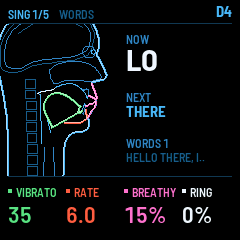
- WORDS (the start, and HOME): each key sings the next syllable of the word slot: the consonants before the vowel when you press, the vowel for as long as you hold, the consonants after it when you let go. Press the next key before letting go of the last and the two syllables join (legato). Harder presses breathe harder. After the last syllable it starts again.
- VOWEL (FX): the keys play pitch only, the voice holding the vowel the knobs set; the last key held sounds, the pitch gliding (Glide) between keys.
- In the beatbox (SEQ) the keys are drum pads, the black keys a hummed bass (below); in the Bestiary (LFO) they play the creature's pitch (below). From 0.7.0.
- Pressing harder on a held key deepens its vibrato (up to 50 cents more), like a singer leaning into a long note. From 0.6.0.
- MIDI in plays as the keys do, and lights the keys its notes fall on (below).
- OCT− / OCT+ move the keys an octave. About 50 ms after the sound dies away the voice rests (nothing is simulated, the output is silent).
Playing from a MIDI controller
MIDI sent to the FM-1, from a computer over USB (a DAW, or a controller plugged into the computer) or from a controller on the FM-1's TRS MIDI jack, plays the voice as the FM-1's own keys do, in WORDS and VOWEL mode, and lights the keys its notes fall on at the current octave. From 0.6.0 it also shapes the voice:
| Controller | What it does |
|---|---|
| Notes | Sing the next syllable (WORDS) or the held vowel (VOWEL), at the note's pitch and velocity |
| Aftertouch (channel or polyphonic) | Deepens the vibrato while a note is held, up to 50 cents more, as pressing harder on the FM-1's keys does |
| Mod wheel (CC1) | Adds breath: from the Breathy knob's setting (wheel down) up to fully breathy (wheel up) |
| Pitch bend | Bends the pitch up to ±2 semitones |
In the beatbox (SEQ) MIDI notes play the pads of the keys they fall on; in the Bestiary (LFO) they play the creature's pitch, and pitch bend bends it.
The FM-1 itself has no mod wheel or pitch bend: these come from the controller. Every MIDI channel is listened to. (Bluetooth MIDI, and a USB keyboard plugged straight into the FM-1, aren't built into this firmware.)
The buttons
| Button | What it does |
|---|---|
| HOME | WORDS mode, page 1 (SING). |
| FX | VOWEL mode and back (a quick press). Held with a key 1-12: that vowel snapshot (below). Its light is on in VOWEL mode. |
| SEL | The next of pages 2-5. (Until 0.5.0 this was EDIT.) |
| EDIT | Opens the word editor on the slot being sung: type words on the keys (below). (From 0.5.0; before, EDIT stepped the pages.) |
| PLAY | Speaks the word slot's words (in WORDS mode). Pressing a key while it speaks starts singing instead. |
| SAVE | Keeps the knobs in the voice preset, the vowel snapshots and the settings, through power-off. Its light is on while something is unsaved. |
| ENV | Sings the word slot on one of CHIMERA's tunes (below). From 0.8.0. |
| SEQ | The beatbox and back: the keys become CHIMERA's drum sounds, with a step sequencer (below). From 0.7.0. |
| LFO | The Bestiary (the seal, the songbird, the alligator or the elephant) and back to the human voice (below). Its light is on in the Bestiary. From 0.7.0. |
| GLO | The debug page (the cores' timings) and back. From 0.8.0 it also opens over the beatbox and the SING page, to see their load while they play. |
The knobs
K1-K4 are the page's four values, shown at the bottom of the screen in their colours (K1 green, K2 red, K3 pink, K4 white). SELECT turns the page. The ranges are CHIMERA's own. (In the beatbox they are its tempo, swing and step cursor, in the Bestiary the creature's settings: see their sections.)
| Page | K1 | K2 | K3 | K4 |
|---|---|---|---|---|
| 1 SING | Vibrato (cents, sung notes) | Rate (vibrato, Hz) | Breathy | Ring (the singer's ring, near 3 kHz) |
| 2 SHAPE | Jaw (opening, cm) | Lips (opening, cm) | Larynx (up / down, cm) | Palate (the soft palate: SHUT, or the nose's opening, cm²) |
| 3 MOUTH | Round (the lips' rounding) | Protrude (the lips, cm) | Root (the tongue root, cm) | Curl (the tongue tip's) |
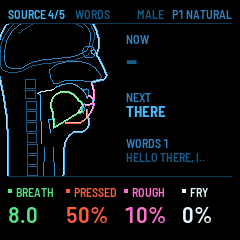
| 4 SOURCE | Breath (the lungs' pressure, cmH₂O) | Pressed (the vocal folds) | Rough | Fry |
| 5 PLAY | Glide (pitch, ms) | Speed (PLAY's speech, ×) | F.Folds (the false folds) | Bright (the vocal folds' closure: darker ← → brighter) |
| VOWEL | Front (← front, back →: F2, Hz) | Open (close → open: F1, Hz) | Nasal (the soft palate) | Round |
The shaping knobs (pages 2 and 3) set the voice's posture, as CHIMERA's do: they shape the held vowels and the voice between words; while it sings words, the words' own movements lead.
Bright (page 5, K4) is how sharply the vocal folds close on each vibration, CHIMERA's own brightness. Low is soft and dark, high is forward and edgy. The presets use it as part of their character.
Body
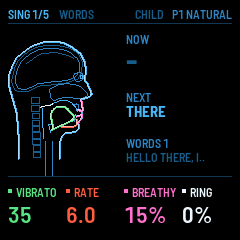
ALGORITHM chooses the voice's body, on every page but the Bestiary's (there it chooses the creature): MALE, FEMALE or CHILD, CHIMERA's three bodies. The body is the whole airway, its size, its throat's length, its tongue and lips, with each body's own calibrated vowels and consonants, so a female or child voice is a different instrument, not a pitch shift. The screen names the body as you turn, and it changes when the knob rests (the voice switches to the new body's anatomy, with a quick fade). The head on the screen is drawn in the body's size, and the header shows the body beside the preset.
- The keys still set the pitch. Each body speaks (PLAY) at its own pitch: 112 Hz male, 205 Hz female, 250 Hz child. Move OCT− / OCT+ to where the body sounds best.
- VOWEL mode follows the body: Front and Open, and the twelve snapshots, reach the same vowels in every body, at that body's formants.
- Presets keep their body: SAVE stores it with the knobs, so a preset can be a child's or a female voice.
(From 0.5.0. Until then ALGORITHM was Bright, and page 5's K4 was Body, which only had the male.)
VOWEL is CHIMERA's vowel pad: Front and Open choose a place among the vowels (by their formants, F1 and F2), and the voice blends the four calibrated vowels nearest it. The screen names the vowel made (in ARPAbet's letters: AA as in "father", IY "see", UW "you", AE "cat", AX the neutral schwa).
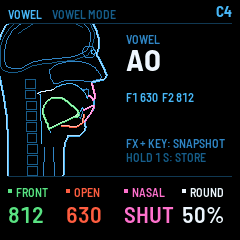
Vowel snapshots: hold FX and press one of the first twelve keys to jump to that vowel (they start as twelve English vowels: IY IH EY EH AE AA AO OW UH UW AH AX). Hold the key a second, with FX, to store the vowel you have made there instead. SAVE keeps them.
Presets and word slots
- PRESET chooses one of eight voice presets, loaded when the knob rests: NATURAL, BREATHY, BELT, OPERA, AIRY, ROUGH, FRY, TWANG (this port's own: CHIMERA has none). SAVE stores the knobs as they are into the preset chosen.
- HOME + PRESET (turn PRESET with HOME held) chooses the word slot the keys sing, 1-8, as the Studio sent them or as you typed them. The screen shows the slot and how it starts.
- In the beatbox PRESET chooses the beat, in the Bestiary the creature's call (from 0.7.0), on the SING page the tune (from 0.8.0).
Tunes
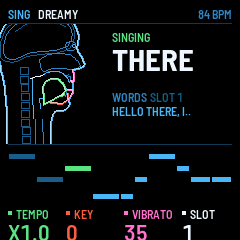
ENV opens the SING page (from 0.8.0): the FM-1 sings the word slot by itself, on one of CHIMERA's tunes, the way CHIMERA's Sing button does. Your words are cut into lines and each line fitted to a phrase of the tune: more syllables than notes split the longest notes, fewer stretch a syllable over several (its vowel carried from one pitch to the next). Each phrase is sung on its own breath.
- PLAY sings, and PLAY again stops. With an empty slot it sings "la" on every note.
- PRESET chooses the tune: DREAMY (minor, unhurried), JOYFUL (major, bright), SOMBER (minor, slow), PLAYFUL (quick short notes, room for many words), GENTLE (a slow waltz), TWINKLE (the traditional tune).
- K1 tempo (×0.5 to ×1.5), K2 key (±12 semitones), K3 vibrato (cents), K4 the word slot.
- ALGORITHM chooses the body: each sings the tune in its own octave (the male an octave down). The voice preset's sound (breathy, pressed, bright...) carries over.
- SAVE keeps the tune, tempo, key and vibrato. ENV or HOME leaves.
The screen shows the head singing, the syllable sounding, and the phrase's melody: each note a bar at its pitch, as long as its beats, the one sounding lit.
Beatbox
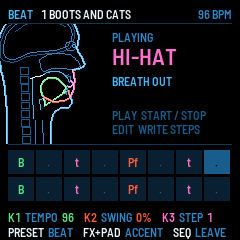
SEQ turns the FM-1 into CHIMERA's beatboxer (from 0.7.0). Every drum is the same simulated mouth making a real beatboxer's sound, the way beatboxers make it, so the head on the screen shows each one being made:
| Pad | Sound | How the mouth makes it |
|---|---|---|
| 1st white key | Kick (B) | The lips shut, the glottis seals and the larynx rises like a piston, then the lips burst (an ejective) |
| 2nd | Snare (Pf) | The lips burst, then the lower lip hisses against the teeth |
| 3rd | Hi-hat (t) | The tongue tip releases into a short hiss |
| 4th | Open hat (tss) | The hi-hat left ringing as a long hiss |
| 5th | Rimshot (K) | The back of the tongue bursts on air the rising larynx compresses |
| 6th | Inward snare (^K) | A sharp breath in past the back of the tongue |
| 7th | Tongue click (!) | The tongue seals a pocket against the palate, hollows it and pops |
| 8th | Lip pop (P!) | The lips sealed, the jaw drops, the lips pop open |
| 9th | Crash (kch) | The back of the tongue releases into a long rounded hiss |
| Black keys | Hum (m) | A hummed bass through the nose, an octave below the key |
The next seven white keys repeat the first seven. A pad sounds as soon as the mouth can make it, about a tenth of a second after the press: the mouth has to get ready (a click's pocket takes longest).
- PLAY starts and stops the beat. PRESET chooses one of eight beats: CHIMERA's seven (BOOTS AND CATS, FOUR ON THE FLOOR, BREAKBEAT, RIMSHOT SHUFFLE, INWARD SNARE, CLICKS AND POPS, HUM BASS) and MY BEAT, empty to start.
- K1 is the tempo (40-200 BPM) and K2 the swing (the off-beats late, up to 60 %).
- ALGORITHM still chooses the body: a child can beatbox too.
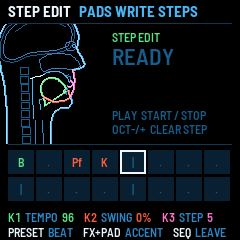
- EDIT writes steps (STEP EDIT): the cursor is outlined on the grid, K3 moves it, and a pad writes its sound into the step and moves on (hold FX for an accented, louder step, marked with a dot). OCT− clears the step and goes back, OCT+ clears it and goes on. Edits are heard at once if the beat is playing. EDIT again: the pads only play.
- SAVE keeps every beat, its tempo and its swing through power-off. SEQ or HOME leaves.
The grid shows the beat's sixteen steps in two rows, each sound's symbol in its colour (kicks green, snares red, hats pink, clicks and pops white, the hum blue), the step playing lit.
The beatbox plays through CHIMERA's close-mic sound (a microphone's bass boost up close, a little presence, a fast compressor), as CHIMERA's does.
Bestiary
LFO swaps the human voice for an animal's from CHIMERA's Bestiary (from 0.7.0), and LFO again goes back to the human body ALGORITHM holds. On the Bestiary page ALGORITHM chooses the creature: the seal, the songbird, the alligator or the elephant (the last two from 0.9.0). Each one is simulated the way the human voice is, from its own airway and its own sound source.
On every creature:
- The keys play its pitch: it breathes while a key is held, the last key held sounding. The keys are shifted by whole octaves to sit in the creature's range (CHIMERA's mapping, centred on middle C): one octave up for the seal, three up for the songbird, three down for the alligator, four down for the elephant.
- PRESET chooses one of its calls. PLAY plays it; FX + a key plays it at the key's pitch.
- K1-K4 are its settings, on two pages (SEL).
- SAVE keeps each creature's settings and call. The beatbox needs a human body: LFO back first.
The screen draws the creature's airway side on, the breath lighting it as it flows.
The seal
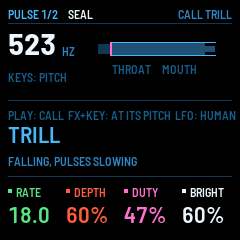
The Weddell seal, whose calls glide down over seconds while their pulses slow (researchers compare them to analogue synths). Its larynx, throat and mouth, its breath pulsing. Its range is 40 Hz to 6 kHz.
| Page | K1 | K2 | K3 | K4 |
|---|---|---|---|---|
| 1 PULSE | Rate (the pulses, Hz) | Depth (how much they pulse) | Duty (how long each pulse lasts) | Bright (the larynx's closure) |
| 2 VOICE | Rough (chaotic vibration) | Breath (the lungs' pressure, cmH₂O) | Mouth (its opening) |
Its calls: TRILL (falling for 3.6 s, its pulses slowing), ZAP (a laser chirp), WHISTLE (dips and returns), CHUG (a low pulsed grunt).
The songbird
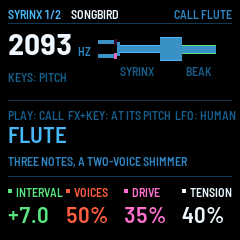
A thrush-sized songbird with two voices: its syrinx has two pairs of labia, one in each bronchus, each with its own pitch. Both feed the trachea, then a throat cavity that can follow the note (a pure, whistled tone), then the beak. Its range is 400 Hz to 9 kHz. The diagram lights each voice's valve as it opens.
| Page | K1 | K2 | K3 | K4 |
|---|---|---|---|---|
| 1 SYRINX | Interval (the second voice, semitones from the first) | Voices (left alone ← both → right alone) | Drive (pure ↔ raspy) | Tension (the labia's) |
| 2 THROAT | Breath (the air sacs' pressure, kPa) | Purity (how far the throat follows the note) | Throat (the cavity's size when it doesn't, cm³) | Gape (the beak's opening) |
Its calls: FLUTE (three notes, then a two-voice shimmer, a wood thrush's), TRILL (a canary's, 16 upsweeps a second), CHIRPS (falling, faster and faster), BUZZ (a zebra finch's, raspy, pulsed by mini-breaths).
(CHIMERA simulates the songbird four times faster than the FM-1's sound runs. On the FM-1 it is a lighter airway at twice the rate, with the syrinx's cycles precomputed from CHIMERA's own equations; its level and harmonics are within a few dB of CHIMERA's.)
The alligator
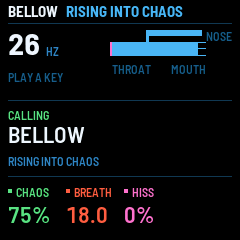
The American alligator (from 0.9.0): a chaotic, very low roar from its larynx through a long throat and a mouth held nearly shut, so the sound leaves by the nostrils and the body itself. Its range is 12 to 120 Hz, much of it below what the FM-1's speaker plays: its roughness and its upper harmonics carry it there, headphones or a speaker with bass the rest.
| Page | K1 | K2 | K3 | K4 |
|---|---|---|---|---|
| 1 ROAR | Chaos (period doubling into chaos) | Breath (the lungs' pressure, cmH₂O) | Hiss (the glottis open: air alone) | |
| 2 AIRWAY | Mouth (its opening) | Nose (the passage to the nostrils) |
Its calls: BELLOW (two seconds of roar, rising into full chaos), GROWL (a short, rough warning), HISS (the mouth and glottis open: pure turbulence), DANCE (a steady subsonic throb, the one that makes the water dance on its back).
The elephant
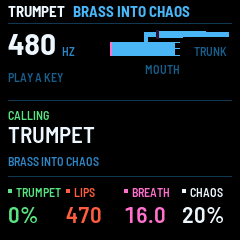
The African elephant (from 0.9.0): rumbles from huge vocal folds, routed through a 1.85 m trunk or the mouth, and trumpets from a valve at the trunk's base that buzzes like a brass player's lips and locks onto the trunk's resonances. TRUMPET (K1) moves from the rumble (the folds vibrate, the valve open) to the trumpet (the folds open, the lips buzz); LIPS sets the lips' own pitch, and the trunk pulls the note to its nearest resonance. While it trumpets the screen shows the lips' pitch, and their valve lights as they open. The rumble's pitch (8 to 45 Hz, the keys) is mostly below hearing: you hear its harmonics.
| Page | K1 | K2 | K3 | K4 |
|---|---|---|---|---|
| 1 VOICE | Trumpet (rumble ↔ trumpet) | Lips (the valve's pitch, Hz) | Breath (the lungs' pressure, cmH₂O) | Chaos (in the folds) |
| 2 AIRWAY | Trunk (the air through the mouth ↔ the trunk) |
Its calls: RUMBLE (three seconds of infrasound through the trunk), TRUMPET (a brassy blast that bends up and breaks into chaos), SQUEAK (the lips tensed, high).
(Both are longer airways than the human's: the alligator's 68 cm, the elephant's 2.6 m with its trunk. Their sound is low, so on the FM-1 each is simulated at half the rate and smoothed back up: measured on the FM-1, the elephant's trumpet peaks at 64 % of core 2 and the alligator's bellow at 30 %. Their levels are within a few dB of CHIMERA's.)
Typing words
From 0.5.0 you can write the word slots on the FM-1 itself, without the Studio. EDIT opens the editor on the slot the keys are singing.
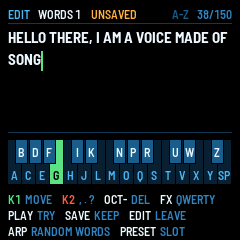
- The keys type, a letter each, in one of two layouts. FX switches between them, and the FM-1 remembers your choice. The screen's keyboard shows each key's letter and lights the key you hold. The keys don't sing while the editor is open; MIDI in still does. - A-Z (the first): the 26 lowest keys are A to Z from the bottom up, black keys included, and the top key (G5) is a space. - QWERTY in two rows: the black keys are a keyboard's top row, Q W E R T Y U I O P, with the last black key a space. The white keys are A S D F G H J K L, then Z X C V B N M. The first key of each row (Q, A and Z) and the space glow softly, and are green on the screen's keyboard, so you can find the rows.
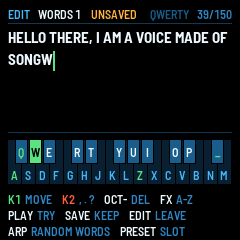
The bottom of the screen lists the editor's controls, so you don't need to remember them:
- K1 moves the cursor. K2 changes the character before the cursor, through A-Z, space and the punctuation
, . ? ! ' -. Commas and full stops give the voice its pauses, as in the Studio. - OCT− deletes the character before the cursor (hold it to keep deleting), OCT+ the one after it.
- ARP fills the slot with a random line of words (3 to 6, from the FM-1's built-in words, which it always pronounces well); press it again for another. As any edit, it's kept only if you SAVE. From 0.6.0.
- PLAY speaks the words as they are typed, to try them.
- SAVE keeps them in the slot, through power-off, and leaves; the keys then sing them. Saving an empty slot removes it.
- EDIT or HOME leaves. If something is unsaved, the first press warns (UNSAVED) and a second press drops the changes.
- PRESET chooses another slot to edit, empty ones included (with nothing unsaved).
A slot holds up to 150 characters. The words you type are pronounced by the FM-1's built-in word list (about 480 common words) and its spelling rules; the Studio can give any word its dictionary pronunciation. The Studio reads the slots back when it connects, so words typed on the FM-1 show up there too. Each of the Studio's slots has a Random button as well, drawing from about 8,600 everyday English words (from 0.6.0).
What the screen shows
At the top: the page (SING 1/5 ... or VOWEL), the mode, the body and the preset; the note while one sounds. The head, side on, moving as it sings: the tongue green, the jaw red, the lips pink, the soft palate white. Beside it in WORDS: NOW, the syllable sounding (a hyphen when its word goes on; SPEAKING while PLAY speaks), NEXT, the one the next key sings, and the word slot; in VOWEL: the vowel made and its formants. At the bottom: the page's four knobs.
SEQ shows the beatbox's page instead (the head as it beatboxes, the sound heard, the sixteen steps), LFO the Bestiary's (the creature's pitch, its airway, its call): see their sections.
GLO switches to the debug page and back: how long each core takes.
| Line | What it means |
|---|---|
| CORE 2 TRACT | The second core's share of each audio block (5.8 ms): the sound waves through the throat, mouth and nose, and the vocal folds, every sample. The average over the last half second, then the worst block. With the songbird all of it runs here (about 44 % at its worst), and CORE 1 shows 0. The elephant peaks at about 64 %, the alligator 30 %. |
| CORE 1 CONTROL | The first core's share: moving the articulators along the gestures, then turning the tongue, jaw and lip positions into the shape of the tract. |
| AUDIO LOAD | The whole audio interrupt's share of its time. |
| XRUNS | Blocks that were late since power-on: each is a click. It should stay at 0. |
| TWO CORES / ONE CORE | Whether the second core is running. If it fails, the voice continues on one core. |
Anything under 100 % fits. The anatomy (the tongue, jaw and lip positions turned into the tract's shape) runs every 4th control step, the tract gliding between. On the debug page K1 tries it every 2nd step or every step, to hear and measure (from 0.8.0; back to every 4th at power-off): every 2nd peaks near 100 % of core 1 while it speaks, every step overloads it (XRUNS count up), and the difference is hard to hear.
K2 on the debug page (from 0.8.0, off again at power-off) turns on a treble shelf: the voice 7 dB quieter above about 2.5 kHz. Measured against CHIMERA's renders, the FM-1's voice is 3-9 dB brighter up there; the shelf brings it about twice as close, but it also dulls the snare and the crash. It is there to listen to, before deciding whether it should stay. The debug page's K1 and K2 work over the beatbox and the SING page too.
The Studio: your words
Open the site's Studio page in Chrome or Edge. On the left is an emulated FM-1 (the same firmware, in the browser): press its START, then Play on a slot speaks that line there, and the emulator's keys sing it. On the right are the eight slots, starting with CHIMERA's presets; each shows its syllables (one key each) and every word's pronunciation from the CMU Pronouncing Dictionary. A word it does not know (a name, a made-up word) gets a box: say how it sounds with words it knows ("kai mirror" for Chimera).
With your FM-1 on USB, Connect loads the slots it holds. Send to FM-1 on a slot puts that line on it (its other slots stay); Update all slots sends all eight. The FM-1 says "WORDS RECEIVED", keeps them through power-off and sings the slot. A slot's badge says whether your FM-1 has it as shown. Read from FM-1 brings back what it holds; Save file / Load file keep sets of words on the computer.
How the words are read
CHIMERA reads English with the CMU Pronouncing Dictionary (134,000 words), which does not fit in the FM-1. The firmware knows the pronunciations of about 480 common words; others are read by spelling rules: CHIMERA's, plus a few of this port's for doubled letters, plural and past-tense endings and the like. The rules get most words close but not all exact, so an unusual word can come out oddly. Words sent from the Studio come with the dictionary's pronunciations, so those are exact.